Watercolor Golden Flowers Elements: A Versatile Decorative Resource for Creative Projects
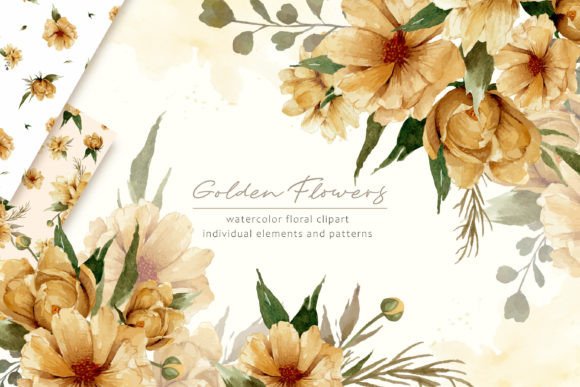
Watercolor Golden Flowers Elements are high-quality, hand-painted illustrations designed to bring a touch of elegance and warmth to various creative endeavors. These elements are crafted with attention to detail and feature golden floral motifs in soft watercolor styles. They are especially popular among designers working on wedding-related content, such as invitations, stationery, posters, and wall art. Whether you're an entrepreneur preparing branding materials or a hobbyist enhancing your scrapbook, these elements offer a seamless blend of beauty and functionality.
Understanding the Components of the Watercolor Golden Flowers Set
This collection typically includes multiple versions of the same design theme to suit different needs. Specifically, it contains:
- 3 Seamless Patterns (PNG format): Transparent PNGs at 300dpi resolution and dimensions of 4000px x 4000px ensure crisp, scalable visuals suitable for both digital and print use.
- 3 Seamless Patterns (JPG format): White background JPGs of the same size provide flexibility for projects where transparency isn't required but clean, professional results are essential.
These formats make the elements highly adaptable across platforms like Adobe Photoshop, Illustrator, Canva, or even Microsoft Word. Their large size ensures that they can be resized without losing quality, which is crucial when designing for banners or posters.
Applications in Wedding Stationery and Design
Wedding planners and designers often seek unique, high-quality assets to differentiate their work. Watercolor Golden Flowers Elements serve as excellent decorative accents for:
- Invitations and save-the-dates
- Programs and seating charts
- Place cards and thank-you notes
- Wall art and signage at venues
The golden tones add a luxurious feel while the watercolor style brings a soft, romantic aesthetic. When used correctly, these elements enhance the overall visual harmony of event designs, making them more appealing and cohesive.
Workflow Integration Tips
Integrating these elements into your workflow begins with understanding how they fit within the broader design process. Here’s a practical approach:
- Pre-Design Planning: Identify the areas in your project where floral patterns will add value. Consider whether transparency or white backgrounds are necessary based on your layout.
- Asset Selection: Choose between PNG and JPG files depending on the medium. For layered designs in digital editing software, transparent PNGs are ideal. For printed materials with a clean look, white background JPGs work best.
- Layering and Adjustments: Import the chosen pattern into your design tool and adjust opacity or blending modes to achieve a natural integration with text and other graphics.
- Export and Final Checks: Ensure the final output maintains the quality of the original illustration by checking resolution and color consistency before sending it off for printing or publishing.
By following this structured approach, you can efficiently utilize these elements to elevate your designs without disrupting your workflow.
Combining with Other Design Assets
Watercolor Golden Flowers Elements don’t have to stand alone. They can complement other design resources such as:
- Typography tools: Pair them with elegant serif fonts or minimalist sans-serif typefaces to match the desired tone.
- Vector-based graphics: Use them alongside vector illustrations for contrast and depth.
- Photography: Overlay them subtly on photos to create a vintage or artistic effect.
- Background textures: Merge with subtle paper textures or gradients to enhance the handcrafted feel.
When combining with other tools, consider using layers and masks to control visibility and placement. This allows for greater flexibility during revisions or adjustments.
Real-World Use Cases
Here are some practical examples of how Watercolor Golden Flowers Elements can be applied:
- Scrapbooking: Use individual flower elements as corner accents or page dividers to add a personal, artistic touch.
- Poster Design: Incorporate the seamless patterns as borders or full-page backgrounds to frame your message visually.
- Freelance Work: Freelancers can use these assets to build client portfolios or deliverables that require consistent, premium-quality visuals.
- Marketing Materials: Entrepreneurs may apply the patterns to product packaging, social media templates, or email headers to maintain brand aesthetics.
In each case, the key is to align the floral elements with the project's purpose and audience. The golden tones are particularly effective for luxury brands, bridal businesses, or seasonal promotions.
Organization and Long-Term Use
To maximize efficiency, organize these elements in a dedicated folder within your design asset library. Categorize them by format (PNG/JPG), size, and intended use. This makes retrieval faster during future projects.
For long-term use, back up the files and consider converting them into reusable templates. If you frequently create wedding-related content, setting up a template with pre-applied patterns can streamline the design process significantly.
Additionally, maintaining a consistent style guide that references these elements helps ensure brand or thematic coherence across all outputs. It also simplifies collaboration with team members or clients who might need to review or request changes.
Quality Control and Compatibility
Before using these elements in a professional context, test them in your preferred design platform. Confirm that the file types are compatible and that scaling doesn’t affect clarity. For print work, verify that the colors remain true to the digital version when printed at different resolutions.
Also, keep an eye on the balance between the floral elements and other design components. Overuse can lead to clutter, so it’s important to maintain a clean composition that highlights the main message or focus of the project.
Enhancing Creativity with Watercolor Golden Flowers Clipart
Watercolor golden flowers clipart provides individual pieces that can be mixed and matched to create custom compositions. Unlike full-pattern files, these standalone elements allow for more control over placement and repetition. They’re perfect for creating bespoke designs rather than relying on generic templates.
Clipart can be used to:
- Add decorative touches to certificates or announcements
- Create personalized greeting cards or gift tags
- Build collages or mood boards for editorial or marketing purposes
One useful technique is to duplicate and rotate individual flower elements to form symmetrical layouts. This can mimic the look of a seamless pattern while retaining the freedom to customize each instance.
Implementation in Digital Tools
Most modern design tools support PNG and JPG formats. In Canva, for example, you can drag and drop these elements directly onto your canvas and scale them as needed. In Adobe applications, you might want to convert them into smart objects to preserve quality during resizing.
When working with transparency, ensure your background layers are set appropriately. Some tools automatically flatten layers upon export, so double-check settings if you need to retain editable layers for later use.
Why Choose Hand-Painted Watercolor Elements?
Hand-painted watercolor elements offer a unique advantage over mass-produced digital graphics. They convey authenticity and a human touch that automated designs often lack. This is especially valuable in niches like wedding design, where emotional resonance and visual appeal play a significant role.
Moreover, since these elements are created manually, they tend to avoid the "robotic" look that can sometimes come from AI-generated or overly stylized vectors. This organic quality helps establish trust and professionalism in your work.
Storing and Reusing for Future Projects
Once you’ve integrated Watercolor Golden Flowers Elements into your workflow, consider archiving the files along with notes about how and where they were used. This documentation can help you quickly recall successful combinations or avoid repeating mistakes in future projects.
If you frequently use similar themes, building a custom library of assets—like these golden flowers—can boost productivity. You’ll spend less time sourcing new elements and more time refining your creative vision.
Conclusion
Watercolor Golden Flowers Elements are a valuable addition to any designer’s toolkit. Their adaptability, quality, and aesthetic versatility make them ideal for a wide range of projects, from weddings to branding materials. By integrating them thoughtfully into your workflow and pairing them with complementary assets, you can create visually striking designs that resonate with your audience.
Whether you’re working solo or managing a team, these elements help maintain a consistent, professional look while supporting creativity and efficiency. As you explore their potential, remember to plan ahead, stay organized, and always prioritize usability and compatibility with your tools and platforms.